Web and app analytics
Your website and your apps in one dashboard
Web, iOS and Android side by side, with the same numbers and the same definitions. See which screens people use, which versions and phones to support and where your campaigns lead, without cookies or device identifiers.
- In every plan, also Free
- Open-source SDK for iOS and Android
- No cookies, no device IDs
- Data in the EU
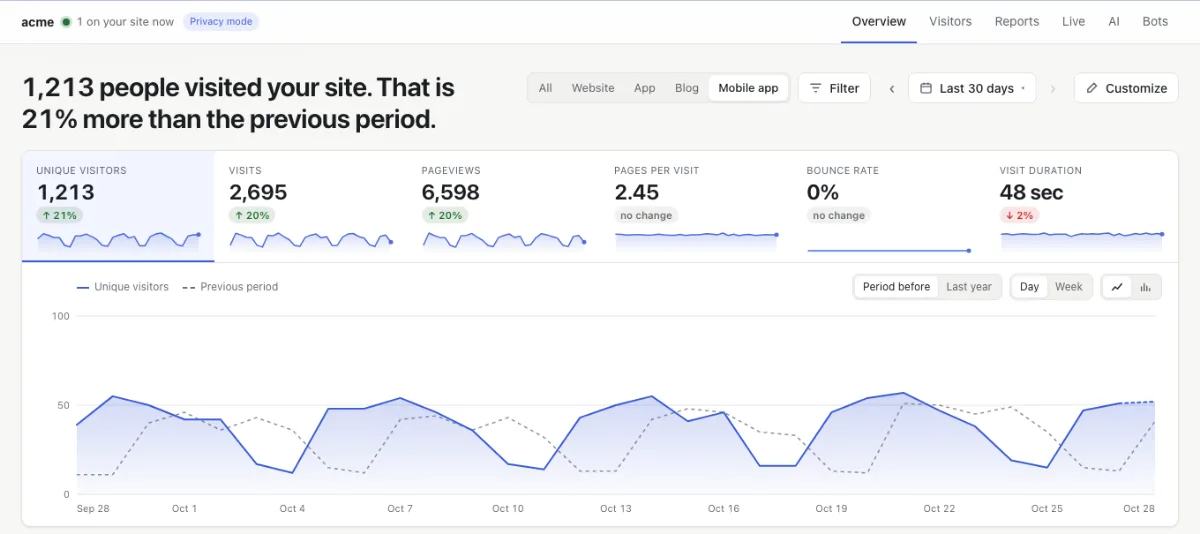
What you see of your app
The same reports as for your website, with what only an app has.
Screens and time on screen
Which screens people open, in which order and for how long. Only the time your app is in front counts.
Your own events
A purchase, a sign-up, a button: send any event with up to 20 properties and use it in goals and funnels.
App and OS versions
See how fast an update reaches people, and which versions of iOS and Android you still need to support.
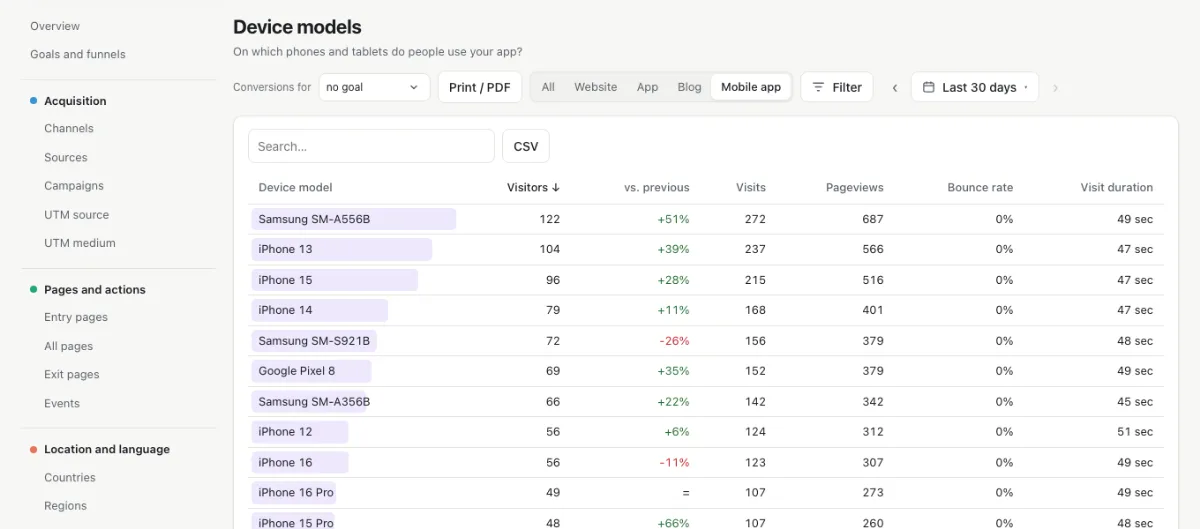
Phones and tablets
The models people use, such as iPhone 13 or Pixel 8, so you know which ones to test on. Rare models are grouped, so no one stands out.
Countries and languages
Where your users are and which language their phone speaks, worked out without storing an IP address.
Campaigns into your app
A deep link with utm tags shows which newsletter or ad brought people into the app.
Which phones to test on
One report lists the iPhones, Android phones and tablets your users have, next to the app versions and the versions of iOS and Android. A model only shows from five users; the rest is grouped.
yoursite.examplecom.yoursite.appcom.yoursite.appWeb and app side by side
Your app is a part of your site. The switch next to the period shows everything, only your website or only your app, with the same definitions in every report, in the API and in your AI assistant.
Running in an afternoon
Add your app
In Settings › Parts, choose + App and enter its bundle ID or package name, as in App Store Connect and Google Play.
Add the SDK
The Swift package or the Android library, one line when the app starts, and a name for each screen.
Nvivio.start(site: "NV-…")Publish an update
As soon as people open the new version, their screens and events arrive in your dashboard.
Privacy that holds on a phone too
The SDK works like the script without cookies, so your app needs no consent prompt for Nvivio where your website needs no cookie banner.
| Stored on the phone | Nothing: no files, no settings, no cookies |
|---|---|
| Identifiers | None: no advertising ID, no device ID, no user ID |
| Apple’s tracking prompt (ATT) | Not needed: Nvivio does not track |
| Apple’s privacy manifest | Included, without any of the APIs Apple asks a reason for |
| App Store and Google Play labels | The answers are in our docs · Read the docs |
| IP address | Never stored |
| Your data | In the EU, in Frankfurt · Why no cookie banner |
What Nvivio does not do
Nvivio does not follow one person from device to device, or from your website into your app. That takes an identifier or a login, and leaving those out is what keeps your users anonymous and your app free of consent prompts. You see web and app side by side, not a profile per person.
No extra price
A screen view counts as a pageview, in every plan, also Free. Your website and your app share the same plan.
For developers
Small, open source and without dependencies: Swift for iOS 15 and later, Kotlin for Android 6 and later.
Questions
Do I need an SDK?
Only for a native iOS or Android app. A website, a web app or your own pages shown inside an app count with the one line of the script.
What about React Native or Flutter?
Packages for both are on the way. Until then, use the iOS and Android SDK through a small native module, or send the requests yourself: the format is open.
Does my app need a consent prompt?
Not for Nvivio where your website needs no cookie banner: the SDK stores nothing on the phone and uses no identifiers. Apple’s App Tracking Transparency prompt is not needed either.
What do I fill in for the App Store and Google Play?
Usage data, coarse location and diagnostics, not linked to the user and not used for tracking. Our docs list the exact answers for both stores.
Can I follow one person across web and app?
No, and that is on purpose. Nvivio shows your website and your apps side by side, but never links people across devices: that would take an identifier or a login.
What if the phone is offline?
Events wait in memory and leave once the phone is online again. If the app closes before that, they are gone: the SDK stores nothing on the phone.
What does it cost?
Nothing extra: a screen view counts as a pageview, in every plan, also Free.
Your website and your apps, together
Start free, no credit card. Add your app in a few minutes.
30 days of Pro free · no credit card · log in with a link by email