Web analytics without cookies · hosted in the EU
See who visits your site. Skip the cookie banner.
Nvivio shows who visits your site, where they come from and what they do, in plain sentences and in your own language. Your data stays in the EU, and the script weighs under 1 kB.
30 days of Pro free · no credit card · log in with a link by email
- One sentence about your period, with what drove it
- Every visit as a route, from first page to last click
- No cookies, no stored IP addresses, data in Frankfurt
- < 1 kBscript, so your site stays fast
- EUyour data stays in Frankfurt
- 24EU languages in the dashboard
- 1 line
<script defer src="https://nviv.io/js/NV-XXXXXXX.js"></script>in your page’s head; the installation page turns green at the first visit
Nvivio tells you what happened
The Overview opens with one sentence about your period, followed by up to six findings, each with the number that proves it: what drove the growth, whether visitors reached your goal, how many came via an AI assistant. No language model writes them: every number comes from your own data. Next to them, Insights compare your week with your usual weeks; a language model in the EU may choose and word those, but never writes a number.
See the dashboardEverything you need to understand your visitors
One sentence about your period
How many people visited, and whether that was more or less than before. Below it, what explains the change.
Every visit as a route
Where someone came in, which pages they read and how it ended, down to “went to booking.com via ‘Book now’”.
Who is on your site now
Who is here, on which page and from where. New visitors slide in; people who leave fade out.
AI assistants as a channel
ChatGPT, Perplexity, Claude, Gemini, Copilot and others form a channel of their own, apart from Google.
Goals and funnels
Count sign-ups, a page or sales with their amount, and see in a funnel where people drop off.
Bots out of your numbers
Bots never count. The Bots page shows who reads your site anyway, AI crawlers included: 104 bots known by name.
Made for many sites
All your sites in one overview, with today’s visitors and who is online, a dashboard in your client’s language, and a link that shows them their numbers.
A public API
Everything the dashboard shows comes from the same public API, with errors that say how to fix them.
No cookie banner. Not for Nvivio.
Nvivio sets no cookie and stores nothing on your visitor’s device. A visitor is recognised for one day only, by a code that changes every day.
- No cookies, nothing stored on the device
- The IP address is never stored
- Nobody is followed from one day to the next
- Database and login in Frankfurt
Stored
- The page, and the site that sent the visitor
- Country, region and city
- Browser, system and type of device
- Language and screen width
- Time on the page and how far they scrolled
Never stored
- The IP address
- The full user agent
- A cookie, or anything else on the device
- Unknown parameters in addresses
- The name of a small company network; only large providers are kept
One line. You see it work at the first visit.
Copy one line into the <head> of your site. The installation page turns green as soon as the first visit arrives.
Your website and your apps in one dashboard
Measure your iOS and Android app next to your website, with a small SDK, without cookies or device identifiers.
- Screens and events Which screens people use, for how long, and your own events, in the same reports, goals and funnels as your website.
- Versions and phones App versions, iOS and Android versions and phone models, so you know what to support and test on.
- No consent prompt, no ATT The SDK stores nothing on the phone and reads no identifiers. Apple’s privacy manifest is included.
yoursite.examplecom.yoursite.appcom.yoursite.appYour website statistics, on your phone
Who visits your website, where they come from and who is online now: your Nvivio numbers on your phone, without cookies, hosted in the EU.
The app shows the websites you measure with Nvivio. You add websites and change settings on nvivio.com.
How the app works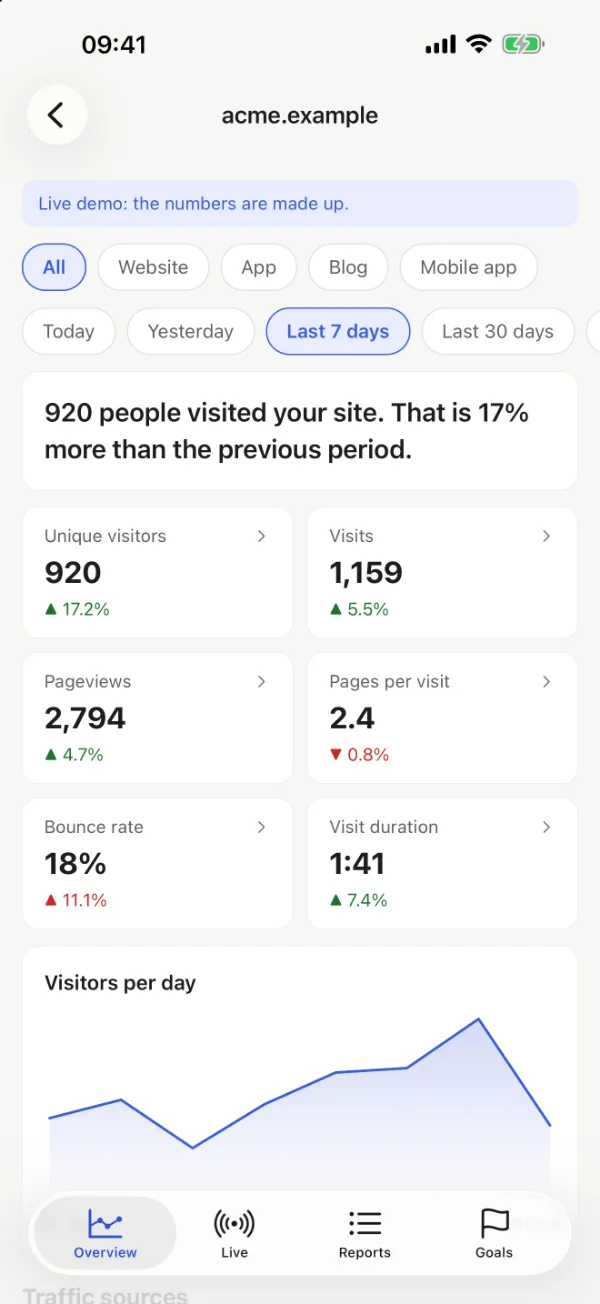
Free for 2 sites
Nearly every feature in every plan: cookie mode and export from Starter, all your sites live on one page from Pro. The plans differ in the number of sites and how long your data is kept.
2 sites · 30 days of data
Questions about Nvivio
What is Nvivio?
Nvivio is web analytics without cookies, hosted in the EU. It shows who visits your site, where they come from and what they do, in plain sentences and in the 24 official languages of the EU. You add one line of code to your site.
Do I need a cookie banner for Nvivio?
No, not in its default mode. Nvivio sets no cookie, stores nothing on your visitor’s device and never stores the IP address; a visitor is recognised for one day only, by a code that changes every day. Only the optional cookie mode needs consent.
Where is my data stored?
In the EU: the database and login at Supabase in Frankfurt, the queue and settings on Cloudflare under EU jurisdiction, and the dashboard next to the database in Frankfurt.
Is Nvivio an alternative to Google Analytics?
Yes, for anyone who wants to know where visitors come from and what they do, without cookies or a consent banner and with the data in the EU. Nvivio leaves out on purpose what analytics for advertising needs: user profiles, advertising pixels and following people from day to day.
How much does Nvivio cost?
Nvivio is free for 2 sites. Paid plans start at €14 a month, excluding VAT. Every new account starts with 30 days of Pro, without a credit card.
How do I install Nvivio?
Paste one line into the head of your pages. That works on any site: HTML, WordPress, Webflow, Framer, Shopify, Next.js or Google Tag Manager. The installation page turns green as soon as the first visit arrives.
Can I see visitors who come from ChatGPT and other AI assistants?
Yes. Visitors who come via ChatGPT, Perplexity, Claude, Gemini, Copilot and others form a channel of their own, apart from Google. The Bots page shows which AI crawlers read your site, without counting them as visitors.
Can I get help in my own language?
The website and the dashboard speak all 24 official languages of the EU; the documentation is in English. Support by email, at support@nvivio.com, is in English or Dutch.
See your own site in Nvivio today
Enter your email address, click the link, add your site and paste one line. That is all.
30 days of Pro free · no credit card · log in with a link by email